Surviving a Virtual Wasteland
Howdy Vados!
It’s Jonathan with another signature DR:TX Rules Ramble about the opening virtual event for Season 8, FOUNTAIN’S HEART! This game will be led by Jonathan Loyd and Fable Brown. This week, we are discussing the the tools you’ll use during our online events, and some tips and tricks for survival during modules in Essex.
Notes & Updates:
TICKETS FOR OUR October event ARE ON SALE NOW!
We’ve updated our setting materials for Essex, the City of Light and Sound. Our website is updated and we will continue to add content, like a brand new map designed by yours truly. Take a look!
Read about our recent changes for Season 8. TL;DR, our access to Bluebonnet has changed dramatically. It’s a challenging update, but we appreciate your support of our game and our community. Take a look!
The Zombie Threats have been updated. Learn all about the most important changes to THE CORPSE CATALOG in our previous Blog Post from Jonathan!
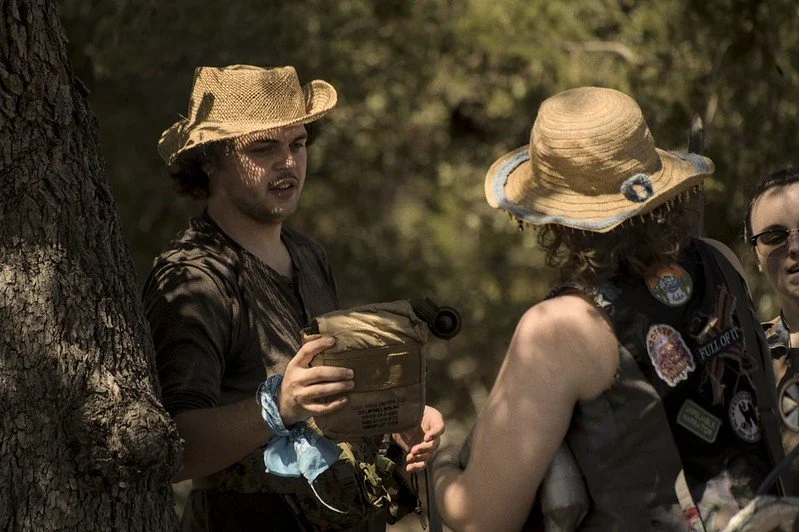
Our photos for this post were taken from previous DR:TX events by our talented Photo Team, including Lily-Jay Jones, Miranda Farmer, Heather Halstead, Noah Goodman, and Max Pohlmeier, and art by James Pardee.

What is Virtual Play?
You can read more in my last blog post, on the Fountain’s Heart. I’ll summarize a few of the more salient parts here:
Virtual Play uses the new DR Live Virtual Play rule set, as found out our network website. This system uses your existing DR Live character sheet on the DR Database to let you experience the apocalypse through a series of short modules run by our Virtual Storytellers, and lets you role-play for hours in our Discord server with friends from across the Network. These games don’t require you to pay for gas to travel to a remote site, be out in the Texas heat while camping, or even need you to swing a boffer weapon.
Virtual Play tickets are also a little cheaper than your regular live event tickets, but include ALL of the bonus XP you can earn in a month. In addition you can get up to 6 hours of ‘virtual crafting’ where we send the physical cards you make to you in the mail, just in time for your next live DR Live event!
Here’s the two primary ticket tiers we are offering for this event:
full build ONLINE TICKET - $75
This is the premium general admission ticket to an online DR:TX event. This ticket includes three (3) extra XP points for each of your active characters with an Advanced Membership, or a character of your choice (8 XP base, 13 XP for new players, Player’s Guide, p. 15). This will allow access to online crafting, roleplay rooms and up to three (3) small group modules led by a DR:TX Virtual Storyteller.
RP ONLY ONLINE TICKET - $50
This is the general admission ticket to an online DR:TX event. You’ll earn XP for each of your active characters with an Advanced Membership, or a character of your choice (5 XP base, 10 XP for new players, Player’s Guide, p. 15). This will allow access to online crafting and roleplay rooms, but does NOT include access to group modules.
Virtual Play uses a simple d20 system to simulate your character actions in the game, like a D&D game. You’ll describe your actions, roll a die when it matters, and narratively tell the story of your character in the virtual wasteland. For actions that progress the scene, you’ll roll a d20, add a bonus based on your Impact or Development Skills against a Difficulty Rating (DR). If you meet or exceed the DR, you’ll be successful. You can expend your Impact Skills, Mind Points, and Resolve during a scene to add to the rolls, re-roll, and give you new actions in combat, simulating your use of Skills during a live event. While it’s not quite the same as our live events, the Virtual Play experience leans into its own strengths — you get to explore places we could never replicate on a campsite, fight monsters in a narrative combat that doesn’t need boffer combat skills, and be a big damn hero in stories that are unique to our Virtual Play events.
You can still craft items during a Virtual Game, and you’ll have your full Mind Point pool and six hours to craft as much as you can. These item cards will be mailed directly to you after the event, and may even include some special goodies for our collectors. You can even earn virtual rewards during your online mods, adding to a virtual inventory of item cards, currency, scrap, and more. You can check out some of these details and restrictions in the Virtual Play Guide.
Virtual Schedule
Each full ticket comes with up to three VIRTUAL MODS, a short adventure for your characters to experience in our Discord Server, led by our talented Virtual STs. During these mods, you’ll get to experience part of the story of the weekend over a module that should take about 2 hours or so to complete, with interludes between for Roleplay in our Discord rooms. Our Room Stewards will be portraying fully costumed NPCs via video chat through out the event, and provide other ways to interact with our story without needing dice. Our final mod of the game, our Story Spotlight, will be hosted live on our virtual stage, where anyone can attend and vote on the threats and outcomes of the final story beat of the event.
Our anticipated schedule for this event is pretty simple, spread out over two days, Friday and Saturday. The roleplay rooms will still be opened on Sunday for final stories, but there won’t be planned events on this last day.
Friday, October 16th
ACT ONE - 7:00 PM to 9:00 PM
ACT TWO - 10:00 PM to 12:00 AM
Saturday, October 17th
ACT THREE - 10:00 AM to 12:00 PM
ACT FOUR - 1:00 PM to 3:00 PM
ACT FIVE - 4:00 PM to 6:00 PM
ACT SIX - 7:00 PM to 9:00 PM
STORY SPOTLIGHT MOD - 10:00 PM to 12:00 PM
We are hard at work on our online modules for this event, and we plan on releasing our Virtual Mod Signup next week, on Friday, October 9th, barring any technical difficulties. We will have a guide for how to sign up online soon!
The Virtual Play System
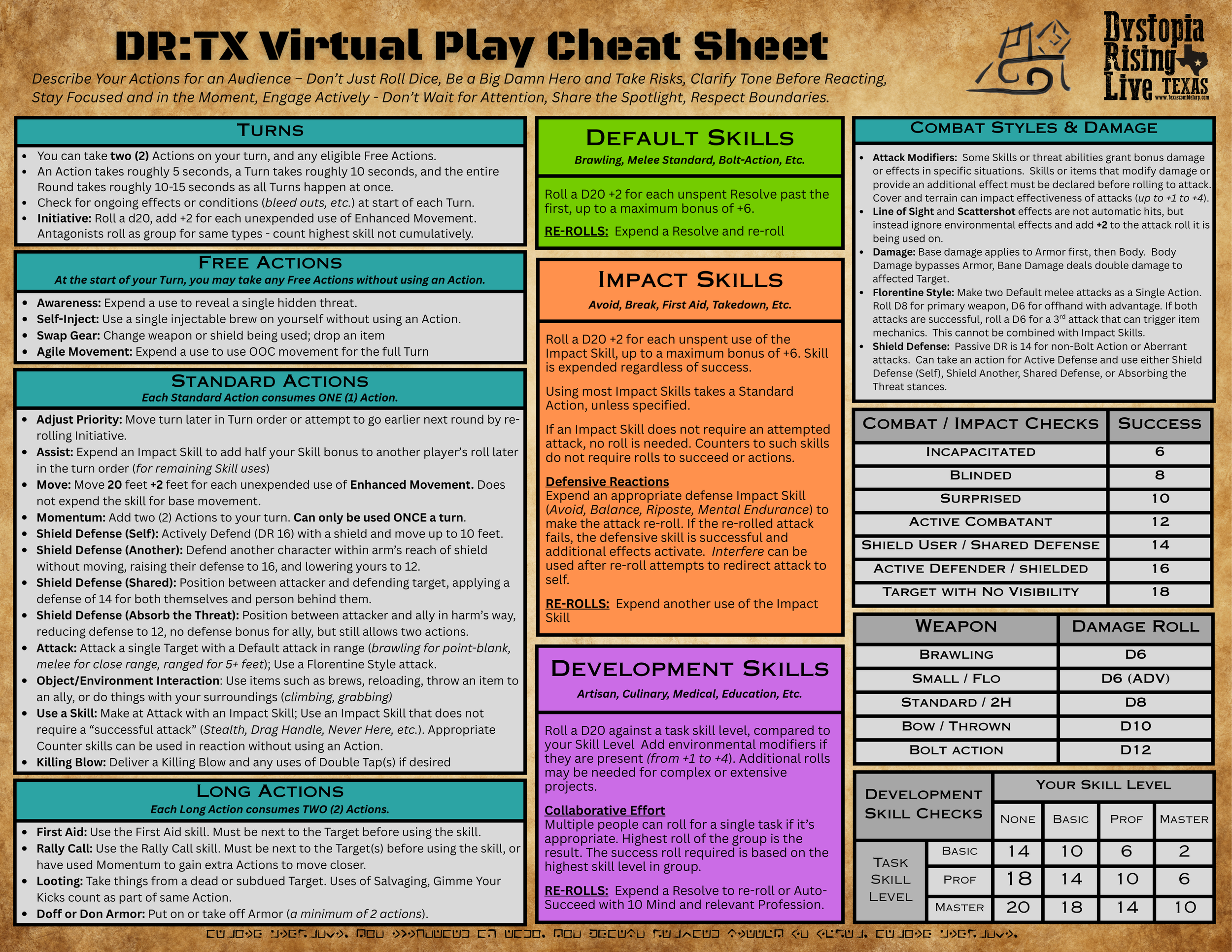
During one of our online mods, you’ll need to use the Virtual Play Rules to adjudicate what happens to your characters, survive a deadly combat, or employ your various skills. While the book itself is only 33 pages, the rules are fairly simple. There’s even a handy cheat sheet I’ll provide at the end to use during your games. There are two primary ways to resolve conflicts within the Virtual Play system for Dystopia Rising Live, ‘roll play’ and ‘role play’. Each has its uses during a virtual game, so let’s cover both briefly.
For the narrative ‘role play’ system, you won’t really roll dice to determine your success and failure. Instead, you’ll tell a story with your Virtual Storyteller and the other players in your mod to determine how you navigate the threats and challenges of the scene. The ST will set a cost to weather the challenge in the form of lost Body points, expended Skills, or longer term consequences like mangled limbs, or something that causes a significant setback for the group. This is one of my favorite ways to tell a scene in a virtual game, as it really allows you to role play through a module without needing to worry about actions and dice mechanics.
The one exception of this option for narrative role play is that it can’t be used in situations with Raiders and Apocalyptic Threats, as these must use the dice system instead. Each of these threats is Killing Blow Active, so you’ll need to deal with them more directly. In some cases, it might be better to evade or not engage with these threats directly lest you need to roll initiative.
In the dice-based ‘roll play’ part of the Virtual Play rules, you’ll use the dice bot on our Discord server to make rolls when requested your Virtual ST. You’ll virtually roll a d20, add the appropriate bonus (up to a maximum of +6) and compare the result to the Difficulty Rating (DR) of the challenge. If you are equal or higher than the DR, you’ll succeed!
Use the typed command “/roll d20 + X” or “/r” to roll dice on the Discord server. Ask your ST for help if you are confused!
There are three core Skill rolls you’ll run into during the game:
Default Skill rolls use your remaining Resolve to determine your bonus, with +2 for each unspent Resolve. This is usually reserved for simple narrative actions that don’t have an equivalent Skill, or basic combat attacks. If you roll poorly and want to reattempt the challenge, you can expend a Resolve to re-roll the dice. As you expend Resolve over the event for re-rolls or other uses, remember your dice rolls will suffer as your character is exhausted and wounded.
Remember, each character starts with three (3) Resolve for free at character creation, so every character starts out with the same chances to succeed!
Impact Skill rolls your remaining Impact Skill uses to determine the bonus, with +2 for each unspent Skill use. You’ll usually need to expend the Skill to make the attempt, so this bonus is usually the number of skill uses you have left, minus one use. You regain your Impact Skills at the end of a module, so these are some of the most common dice rolls in a mod. You can reroll a failed Impact Skill roll by expending another use of the Impact Skill. Some Impact Skills don’t need dice rolls, and can simply be expended to use their abilities, like Rally Call or Stealth.
Development Skill rolls are against a Difficulty Rating based on your Skill Level, versus a Task Skill Level. These are longer challenges that may involve rolling the dice more than once over a challenge. You’ll be able to work together with your friends to complete the challenge, and anyone can participate, even if they don’t have the Skill. You can re-roll these checks by spending 10 Mind points, or using a point of Resolve.
Overall, the ‘roll play’ option is pretty simple. The cheat sheet I’ve put together for the event should make some of your basic choices easy to understand, but there’s a few extras in the actual rule book to consider that aren’t on this cheat sheet. It’s meant as an assistant in the scene, not a replacement for reading the book. The actual dice mechanics of the book are only about five pages or so, so it’s not too much work to read up before the event.
Most modules will simply require a dice roll when you need to progress the scene forward and have a risk of some kind of failure. You won’t roll dice for stuff you can easily do, only for actions and events that have a chance for some kind of consequence. All of your DR skills used in the live events can be used here, but a few work a bit differently.
Combat in the Virtual Play
In the dice system, combat works a bit differently than in live play. Instead of swinging a boffer, you’ll need to roll dice to hit, inflict damage, and deal with the threats you face. This is a bit more crunchy mechanical system, but it’s still pretty straight forward.
You’ll start a combat by determining your turn order, and you’ll usually add a number to the start of your server Discord name to make it easily to tell what order you act in the initiative. Each time you get called upon, you’ll get a chance to take a Turn, which consists of you take two (2) Actions, and any Free Actions you can. Usually this will be something like attacking a zombie and rolling a dice, but some skills work a bit differently here. Once everyone has gotten a chance to act, the Round will be over. A Round usually lasts about 10-15 seconds, and this is used for most mechanics that have some kind of time limit for how long they last.
Each time you take your Turn, you’ll narratively describe your actions in the fray, describing how your survivor is engaging with the challenge. Remember to describe your action for the audience of your fellow players! It’s far more interesting to tell a cool story of your dice rolls than simply typing ‘/r’ into the chat. If you have questions, your Virtual ST will be there to help you along.
There are three types of Actions you take, Free Actions, Standard Actions, and Long Actions. Free Actions are used at the start of your Turn, but are fairly specific actions. You probably won’t take a Free Action every Turn. Standard Actions are the meat and potatoes of your combat, and usually involve Attacks, Movement, and using Skills. Long Actions take both of your two Actions each Turn, and represent skills that take a bit longer to activate in a combat, or something demands concentration.
Combat skill checks work similarly, rolling a d20 and adding your bonus, and comparing the result to the Difficulty Rating. Your DR to hit can be reduced by environmental factors like attacking a blinded opponent, or increased, usually by using a shield in combat.
Once you’ve determined if you hit, you’ll roll for damage and inflict a wound against the enemies Armor or Body. Once an enemy has taken enough damage, they will be in Bleed Out, and you can take an action to perform a Killing Blow or Double Tap and win the day. It’s that simple!
There’s a few Skills and abilities that have slightly altered duration and effects in combat, and you can see the complete list on page 14 of the Virtual Play Guide. In general though, remember an Action is about 5 seconds, and a Turn is about 10 seconds. If something lasts 30 seconds in combat, it’ll last about 3 Turns in virtual combat.
crafting and equipment in Online Play
While the mechanics for Virtual Play are pretty simple, you’ll usually be able to use all of the abilities on your character sheet during a virtual event mod, like Impact Skills, Mind Points, and Resolve. However, your item cards work entirely different during an online event! Each character has an online inventory called LIT, and once you’ve earned items during a virtual game, you can use these at any chapter’s virtual game you attend.
I’ll cover in more details about the specific crafting mechanics in a later blog post, but let’s cover the important facts about online items and your virtual inventory.
You can only use ‘virtual equipment’ for an online game. Any item cards you’ve collected during a live event cannot be used during our DR:TX virtual events. This means that most folks won’t have their standard item cards for these games unless you’ve crafted them at a previous online event. Once you’ve added items to your virtual inventory, you generally won’t be able to bring these into a live event — you’ll need a separate set of weapons, armor, and gizmos for use during online events.
You can earn item cards as rewards during an online module! Don’t worry, we know that many of our Texas players won’t have online inventories yet, so there will be plentiful opportunities to build up your online gear during mods when you attend our October event, Fountain’s Heart. While it might seem like a bit of a shock at first to not have that trusty Cullingwood Blade in hand like you do in a live game, there will be many ways to earn equipment during mods. Each player can earn items during virtual mods that’ll you’ll be able to use during online events, just as if found an item card on a zombie or raider during a live event. This is one of the best ways to build your virtual inventory, because you don’t need to be able to craft with Skills like Artisan or Culinary.
There are limits on how much equipment you can earn through online mods. Because you aren’t always at risk during an online event like you can be during a live event, there need to be some common sense limits on how much you can earn during a mod. You can find the complete list of what can be earned across all of your characters during an event on page 35 of the Virtual Play Guide.
In general, you can only earn one (1) item card that is a weapon, armor, shield, or trap during an event, TOTAL. This is the hardest limit of online play, so choose carefully when you earn a reward. For most characters, a weapon or armor should be your first priority to add to your virtual inventory, and remember this is a per player limit, not per character.
You can earn up to ten (10) Gizmos, five (5) Brews, five (5) Meals, fifteen (15) Brass, and three (3) Trade Notes during a online game, and some reasonable limits on Scrap, Herb, and other materials. Check page 35 for a complete list! These are the allowed maximums, and you likely won’t max out every category during an event during mods.
Equipment is nice to have, but not necessary! I’ve been preaching this since Dystopia Rising Live started, but equipment is far less necessary for success during an event, even an online one. Most of the power of your character is on your character sheet in Skills and abilities, not item cards. Equipment won’t add bonuses to your dice rolls in virtual! If you are using the narrative ‘role play’ option during a mod as opposed to ‘roll play’, equipment will probably not come up that often. Many items aren’t quite as useful in an online game, so I’ve found that you may even want to collect different items for your character during virtual events.
You can turn in an existing item card during a live event to add to your virtual inventory. This is often the easiest way to gain more virtual equipment, and we will have several mods during our live games that give you ways to earn these virtual items. Because this is done during a live event, there’s no limits to how much you can add to your virtual inventory, only that you can’t pull it back out later. I know this isn’t super useful before our next event unless you travel to another chapter, but it’s something to keep in mind during our live winter events in December and February.
Tips and Tricks for Online Play
While the mechanics for Virtual Play are pretty simple, the dice system can mean certain Skills and equipment are more or less useful during a virtual mod. With that said, let’s talk about some handy out of character tricks to survive your first virtual Dystopia Rising Live event.
Video cameras and microphones are a must for online modules. Virtual events will require you to log onto our Discord channel and engage in voice chats with your fellow players. Ensure your devices are compatible in advance! While we will have some text-only channels for role play, you’ll generally need to be able to log into the Discord voice chats to participate in an online mod. While it is entirely possible to use your phone to play a virtual event, I’ve found it better to have a quiet place with your PC to role play online. It can be challenging to enter commands into a Discord chat while also connected to your phone’s camera.
Costumes help add to your immersion in an online event. While it’s not exactly the same as a live event, taking time to put on a costume, makeup, and accessories for your character can be a great way to engage in role play during a virtual event. I’ve found that its always easier to get into character when I have my favorite costume piece on, and online games are no different. Consider the background behind you during a video chat, and simple items like candles, blankets or cloth to cover up other non-genre stuff in your home, or even other post-apocalyptic character props nearby can add to the scene.
Describe your actions for an audience, don’t just roll dice! The surest way to get involved in an online mod is to put on your actor’s hat and play up your actions. Take risks, and be a big damn hero, and try to do something new. Describe how you rip and tear into that zombie with your chain sword, flinging guts in every direction, don’t just roll a d20. Leap and bound from the rickety train car onto the airship, dangling from a rope over the gaping chasm of the Dead Drop. Slide behind cover as you reload, spraying the enemy with covering fire while you plan your next move. You can often do a bit more in a virtual space than you can in a live event - you aren’t tiring yourself out by running across a camp site, and your online characters can even do some things physically that you can’t in the real world. Take advantage of the unique benefits of the online scene, and make it memorable.
Stay focused and in the moment. Engaging scenes require focused effort from everyone involved. Try to avoid distractions and avoid distracting others. Log out of that video game, and focus on the scene at hand! Pay attention to the other characters in a scene, and make sure you are ready when it is your Turn during a combat. The surest way to turn a mod into a bunch of people rolling dice at each other is to be distracted by a phone game or a TV.
Engage actively, don’t wait for attention. Unlike live events, where familiar characters can naturally attract attention, virtual environments may require more proactive engagement to be noticed. Join the voice chat and try to get involved with the groups that are in the virtual room. Consider engaging with our role play prompts in the chat channels, or post a picture of your character so we can have idea on what to expect in our mind’s eye. How can you involve the other characters in your role play and say ‘yes, and’ to their ideas?
Plan time for breaks and food. Despite the appearances, it can still be tiring to be involved in a virtual event. Don’t forget to eat, drink water, and take time away from your PC during a virtual game. We will have planned breaks between our mod series that will make it easy to step away briefly without missing any of the big events.
Mechanically speaking, here’s some other considerations for the event. This is a role playing game after all, and mechanics are always helpful to enhance your game.
Virtual Equipment is nice, but not necessary. If you are using the narrative ‘roll play’ option during a mod, equipment will not come up that often. I know I’m repeating this here, but I’ve been to a number of virtual events this year and never needed equipment during a mod. Many of our virtual mods this game will favor the narrative system as opposed to the dice mechanics, as we know that most of our players are starting fresh. Don’t worry about trying to get the perfect items right away, but it’s still worth considering a wish list of the items you’d like to get in game - we will be generous with rewards during these first virtual events!
Resolve is the most precious resource in virtual play! Resolve only refreshes between events, so once you’ve used a point of Resolve to re-roll a dice, you won’t get it back. Not only does using Resolve slowly wear down your bonuses for Default Skill checks, it means its far more easy to earn a Fracture by spending all of our Resolve than it is in live events. It might be worth it just to accept a missed attack than to use your last Resolve. Characters that have invested XP in Resolve will definitely feel the difference in virtual play.
Mind Points only refresh at the end of the event, and count anything you used during pre-game crafting. I’ll discuss this in a future blog post, but it might be worth saving some Mind points to use during the event. Anything you spend during the pre-game crafting is expended at the start of the event and won’t refresh before the game starts. You’ll need to use a virtual Brew or Meal card in game to regain points, or other abilities to regain lost Mind Points. Not only will Mind Points let you re-roll Development skill checks, you might need them to use certain gizmos and equipment you’ve earned through module rewards.
Weapons and Armor are the most impactful items during Virtual events, and it’s worth considering what single item reward you will pursue before the event. You can only earn a single weapon, armor, shield, or trap as online module rewards, so you’ll need to choose carefully what you want when you gain this reward. Weapons that improve your damage are much more impact in virtual play, particularly items like the Wildwind Machete that let you do repeated damage without spending Mind points or Resolve. Armor is always useful, especially in a scenario where your physical skill at dodging a boffer is less relevant — the extra Body points will make sure you stay up longer. Gizmos that give you additional options during a scene can be more relevant, like Freeiron Nurse’s Tools, or the Seek the Damned Blade.
Don’t forget the consumable items like Brews and Meals, as you can earn many more of these during online mods. While you will fully heal Body between mods, you won’t regain Mind points back. Healing brews and injectables are equally important for dice combat, as you will need to consider how to heal yourself during a longer fight. These will be frequent rewards during online games, so it should be easy to get a few brews right away during our October event.
You can trade your items with other characters for crafting items later. Even if your character doesn’t have the Artisan or Culinary skill, gathering items like Scrap and Herb can still be useful. You can trade these to other characters so they can use the items to craft at a later event, or in trade for goods and services. While the economy game is a bit different online, there’s still a lot of rewarding ways to collect rectangles in virtual play.
Alts are fun, but remember the module reward limits are per PLAYER, not per character. It might be worthwhile to focus on just one character at your first online event, particularly your character with the most Skills and XP. While most characters are pretty even in online play, having extra Impact Skills and Resolve can go a long way to improving your odds when rolling the dice. You’ll also need to split any items you gain during a mod between different characters if you play multiple PCs with your Advanced Membership, so choose carefully who attends a mod.
Wrap Up
That’s it for today, Vados!
We hope that you will come join us for our first virtual event of Season 8, FOUNTAIN’S HEART! What will you do during your return to the City of Light and Sound? Will you help address the existential threat that a city this large represents to your hometown of Bravado? Will you help fight off the Raider menace of Pride’s Hold? How will you prepare for another (virtual) year in the Zombie Apocalypse?
Let’s find out together! See you soon, Vados!